 Dictavault
Your voice memos become a written archive. Yours alone.
Dictavault transcribes and cleans up hundreds of hours of voice memos right on your Mac. No cloud, no account, no leaks.
From voice to clean text.
Three steps, entirely on your machine. Drop in a folder, get back readable text files.
The voice
Your memos, in any audio format: m4a, mp3, wav.
The transcription
whisper large-v3 running locally: very high quality, open source.
The cleanup
A local LLM fixes punctuation and errors, and splits into paragraphs.
The heart of the project
A voice memo is intimate. It stays with you.
Ideas, doubts, things you'd tell no one. With Dictavault, transcription and cleanup run entirely on your machine. No server, no required API, no data sent anywhere.
Local transcription
whisper.cpp runs on your Apple Silicon Mac. Zero upload.
Local cleanup
AI proofreading also happens offline. The text never leaves.
Zero cloud by default
No account, no telemetry. Turn off Wi-Fi, it still works.
You already have everything you need
Your voice memos are sleeping in your phone.
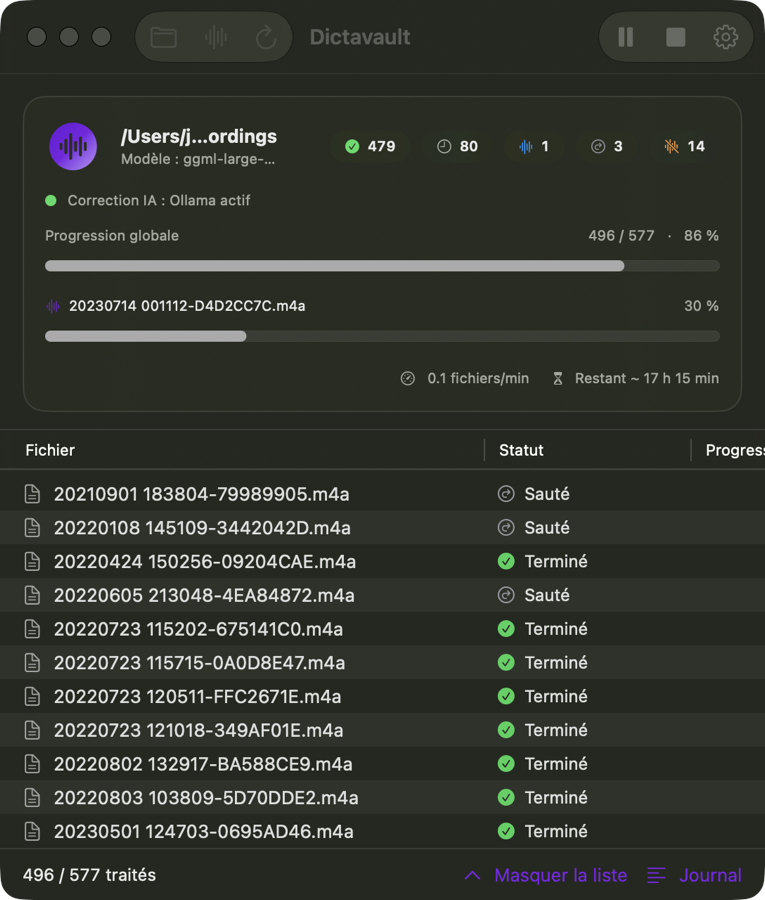
Point Dictavault at the folder and it transcribes everything, even overnight, and picks up where it left off if you relaunch it. One clean, dated text file per memo, ready to reread and search.
A bit of history
Writing at the speed of speech, for 2,000 years.
Around 60 BC, Marcus Tullius Tiro, Cicero's secretary, invented shorthand to capture speeches word for word. Dictavault takes up the idea and adds what Tiro didn't have: a vault. Your dictation, transcribed, cleaned up and filed, never leaves your machine.
Two thousand years ago, a man wrote at the speed of speech. Today, an intelligence does it for you.
Built for thousands of files.
Batch processing
One folder, thousands of memos. Dictavault works through them one by one.
Overnight runs, resume
Let it run overnight. It picks up where it stopped, without duplicates.
Maximum quality
The large-v3 model plus AI proofreading, for faithful, readable text.
txt and Markdown
Clean output with a dated header, next to each file.
Native macOS
Lightweight SwiftUI app, standard window, native controls.
Free to start
A free MVP. What matters is that it's genuinely useful to you.
Download Dictavault for macOS.
Free, 100% local, no account. macOS 14 or later, Apple Silicon Mac.
Download Dictavault.dmg- Open the DMG and drag Dictavault into Applications.
- First launch: right-click the app, then Open (the app isn't notarized by Apple yet).
- Click Mac Voice Memos, then Start. The transcription model and the cleanup engine install themselves, once. The app follows your Mac's language (English or French).
Source code and releases: GitHub.